


Quick answer
Why can't I mark the auction ready?
A red line on the ready list still needs a fix. Until then, Mark ready stays grey.
Who this is for: The organiser, or a Manager of the tournament.
Where to find the list
Open the auction page: your picture at the top right → My auctions. Or your tournament → the Auction tab.
Scroll to Before it can be ready (2).
Small grey words under a line name its teams or players, like DHK · Dhaka Kings.
Click the blue link under the line, like Open settings → or See the teams ↓. It takes you to the fix.
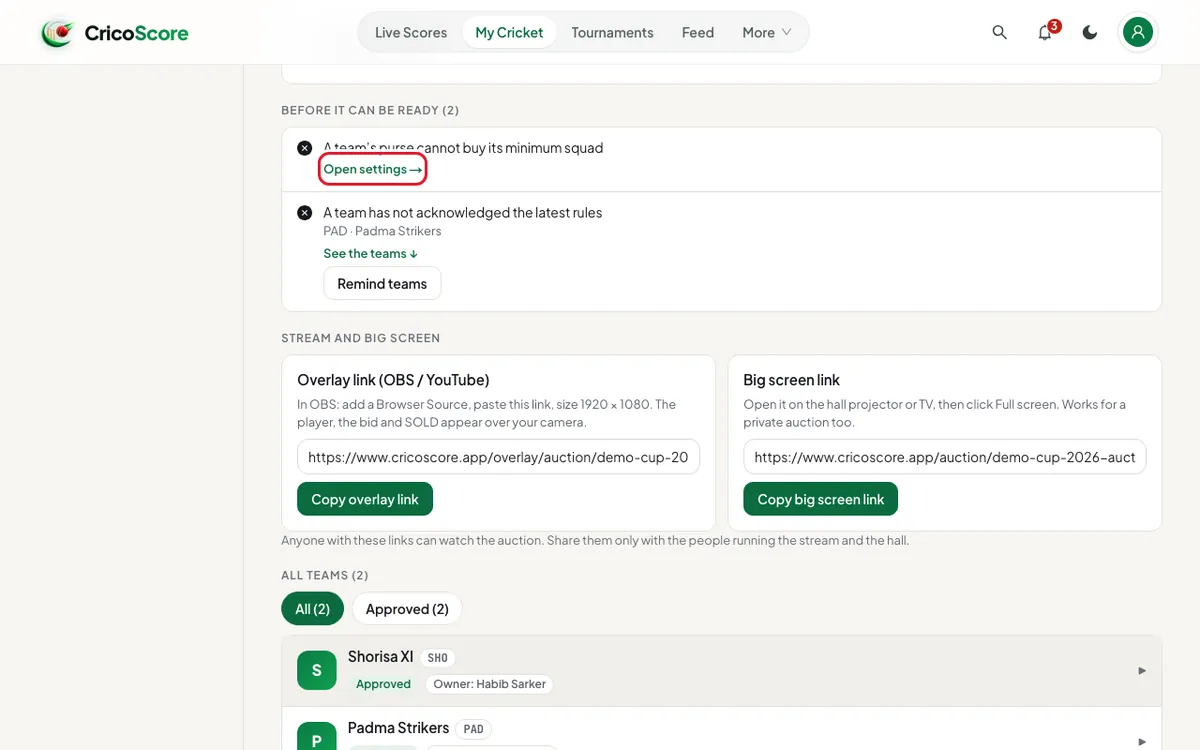
Picture 1. Tap or click to see it bigger.
When every line is fixed, it says Ready check and Everything is in place. Then click Mark ready (WK1, Part 8).
Red ✕ lines stop you. Lines with a ! are warnings: read them, but they don't stop you.
Red lines: fix these first
Settings
| You see | What it means | How to fix |
|---|---|---|
| Settings still blank | A needed box is empty, like Purse per team. | Click Open settings. Fill each named box. Click Save settings. |
| A rule setting is not valid | A number is wrong, like smallest squad above largest. | Click Open settings. The red Fix these first box says which one (WK4). |
| A team’s purse cannot buy its minimum squad | At base prices, it can't fill its smallest squad. | Raise the purse, or lower the base prices or the smallest squad. |
Example: purse Tk 25 L, smallest squad 11, base Tk 2.5 L each. Eleven players cost Tk 27.5 L, so the team is Tk 2.5 L short.
Teams
| You see | What it means | How to fix |
|---|---|---|
| At least 2 approved teams are needed | You need two or more Approved teams. | Click Invite or approve teams. |
| Decide every team application and invite | A team still shows Applied or Invited. | Click Decide the teams. Approve or reject each. Invited teams must click Accept or Decline (WK5). |
| A team has not acknowledged the latest rules | A team hasn't clicked We have read the rules since your last save. | Click Remind teams. One reminder a day. |
| One person acts for two teams | One account runs two approved teams. | One team removes that person under Team admins (WF6). |
| An approved team was deleted | Its owner deleted the team. | Click See the teams. Open the team, click the ⋯ button → Reject / remove from auction. Invite another team. |
| An approved team is not in the tournament | It was taken out of the tournament. | Add it again: tournament → Teams → Add teams (WF2). |
Players, sets and retentions
| You see | What it means | How to fix |
|---|---|---|
| Some approved players have no category, price or set | A pool player lacks one of these. | Click Complete the players. Fill the gaps. |
| A team owner or admin is in the player pool | A person who runs a team also registered to play. | Click See the players. Reject that player. |
| There is no set yet | Players are called set by set. | Click Open sets. Make a set, add the players, click Save sets. |
| A random set has no saved seed | A Random set needs a saved draw. | Click Open sets, then Save sets once more. |
| Some retentions are still waiting for a decision | A keep request still says Sent to organizer. | Click Decide the retentions. Confirm or Send back each. |
Warnings: they don't stop you
| You see | What it means | What to do |
|---|---|---|
| The pool may be too small for every team’s squad | Too few players for every smallest squad. | Approve more players, or lower the smallest squad. |
| A team cannot reach the minimum spend | Squad full, minimum not spent. | Lower the minimum spend. |
| Some players have no previous team (no RTM for them) | RTM is on, but these players have no former team. | Fine for new players. Else See the players → Set previous team. |
| The squad-mix minimums add up to more than the squad | "At least" rules ask for more than the largest squad. | Lower those numbers in the settings. |
| Not enough players for a squad-mix minimum | E.g. 6 teams need 2 keepers each; the pool has 8. | Add players of that kind, or lower the rule. |
ℹ️ Each settings save asks every team to accept the rules again. After Mark ready, the rules lock.