CricoScore appThe CricoScore app is live on Google PlayLive on Google PlayScore ball by ball, even offline, and get live alerts on your phone.Get the appInstall

Quick answer

How do I share a match?

Match pages have no share button yet. You can share the link, or a picture.

  • 1 min read
  • 1 picture
  • Checked 29 October 2026
  1. Open the match page.

  2. Copy the address from the top of your browser.

  3. Paste it in Facebook, WhatsApp or Messenger.

The link shows a preview picture of the match.

Share a picture

  1. On the match page, open the Scorecard tab.

  2. At the bottom, click Download Scorecard. A picture saves to your phone or computer.

  3. Share the picture like any other photo.

When the match has ended, the Summary tab also has Download Summary.
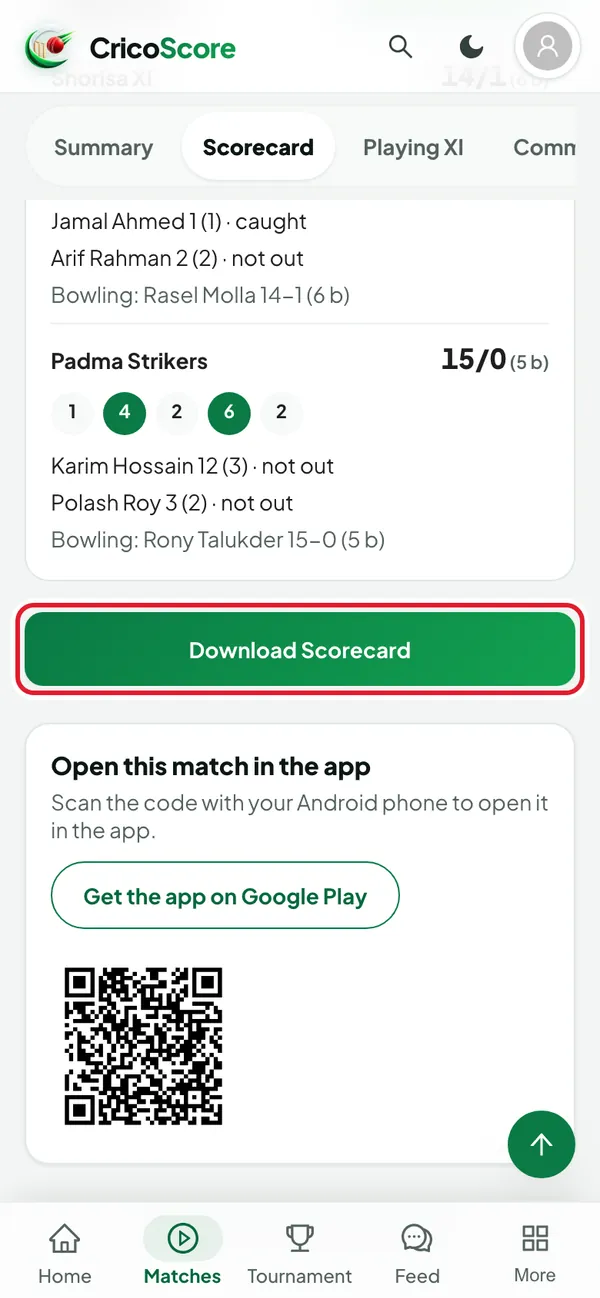
The Scorecard tab of a finished match on a phone, scrolled to the bottom of the scorecard. The Download Scorecard button is circled.
Picture 1. Tap or click to see it bigger.
The Scorecard tab of a finished match on a phone, scrolled to the bottom of the scorecard. The Download Scorecard button is circled.

Was this guide helpful?